How Do I Do SEO for Multiple Locations?
Multi-location local SEO gives each branch its own local search presence while keeping everything under one main brand.
For example, a business with outlets in Orchard, Tampines and Jurong East should not rely only on one generic page listing all three addresses.
A simple structure would be:
example.com/locations/orchard/
example.com/locations/tampines/
example.com/locations/jurong-east/
Your main site can target broader brand and service terms, while each branch page provides useful information for searches around that specific outlet.
This gives each URL a clearer role instead of making multiple pages compete for the same purpose.
Do I Need a Page Per Outlet?
For most businesses with genuine physical locations, a dedicated page for each outlet is a strong approach.
Google does not require every branch to have its own page, but a location page gives customers somewhere useful to land and lets you present branch-specific information clearly.
Each page should include:
- Address
- Opening Hours
- Services
- Directions
- Contact Details
- Photos
- FAQs
The goal is not to make every page long. It is to make every page useful.
Where exactly is the branch? Which MRT exit should I use? Is parking available? Does this outlet offer the same services? Is it open on Sunday?
Those details help users and naturally give each page more local context.
How Do I Manage Multiple GBP Listings?
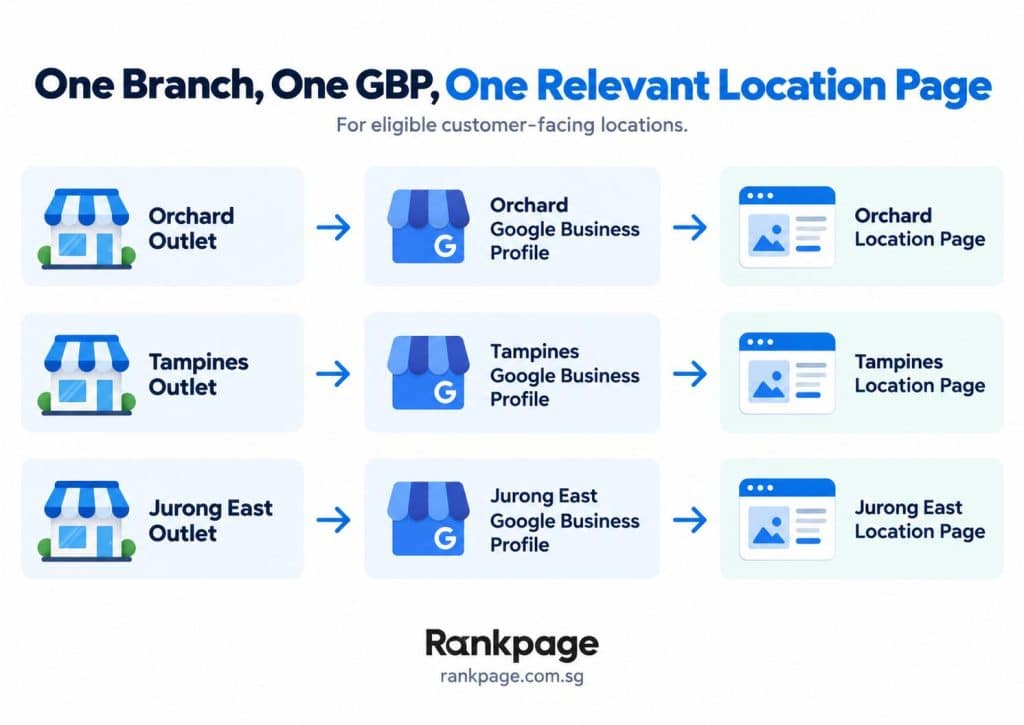
If customers can visit several separate physical branches, each eligible outlet should generally have its own Google Business Profile.
The cleanest setup is:
- Orchard outlet → Orchard GBP → Orchard branch page
- Tampines outlet → Tampines GBP → Tampines branch page
- Jurong East outlet → Jurong East GBP → Jurong East branch page
This makes it easier for customers and search engines to connect each outlet with the right page.
It also makes performance easier to compare between branches, including calls, directions, website clicks and reviews.
For businesses with many outlets, consistency matters. Keep one internal record of every branch’s approved name, address, phone number, hours, profile link and page URL.
That way, when something changes, you are not updating information from memory.
One GBP or Many?
For a genuine multi-outlet business, the answer is usually one profile for each eligible physical branch.
Avoid using one profile to represent several separate locations if customers visit them independently.
At the same time, do not create several profiles for the same outlet just to target different keywords. Google generally allows one profile per business location, with specific exceptions for certain departments and eligible practitioners.
A useful rule of thumb is:
One eligible branch = one GBP = one relevant location page where appropriate.
Each branch can build a different local reputation. An established Orchard outlet may have hundreds of reviews, while a newer Punggol branch has far fewer.
Keeping locations separate allows each branch to build its own local presence.
How Do I Avoid Duplicate Content Across Branches?
A common multi-location SEO problem is creating ten branch pages, copying the same text and changing only the location name.
Using the same template is fine. Similar branding and repeated business information are not automatically a problem.
The issue is when the pages add little value beyond targeting different areas.
Instead, make each page locally useful.
For example:
Access: Two minutes from Tampines MRT.
Facilities: Free parking available in the building.
Services: Certain treatments available only at that outlet.
Local Context: Convenient for customers in Tampines, Simei and Pasir Ris.
Branch Details: Specific staff, photos or FAQs.
Another outlet may have different transport access, opening hours, services or facilities.
You do not need to rewrite your brand history ten times. Focus on what actually differs at each branch.
How Do I Rank Each Branch Locally?
Ranking each branch comes down to strengthening the local signals around that outlet.
Google says local results are mainly based on relevance, distance and prominence, so branches under the same brand can still perform differently.
Keep Branch Information Consistent
Make sure the address, phone number, opening hours and website link are accurate across the branch page, GBP and other important listings.
Link to Branch Pages Internally
Do not bury location pages deep inside the website.
Create a central Locations page and link clearly to every branch. Relevant service pages can also link to applicable outlets.
This helps users and creates a clearer site structure.
Add Real Local Context
A Jurong East page should contain information that genuinely helps someone visiting Jurong East.
Mention nearby MRT stations, landmarks, parking or building access where relevant.
Avoid forcing location names into every sentence. Local relevance should come from useful information, not repetition.
Build Reviews Around Each Outlet
Customers who visit one branch should ideally leave reviews on that branch’s profile.
Google says review quantity and positive ratings can contribute to local ranking, alongside other factors.
Support the Branch Beyond the Website
Relevant local links and mentions can help too.
A branch may be referenced by a nearby mall, business association, event partner, school, clinic directory or local publication.
Focus on genuine, useful references rather than large numbers of low-quality directory links.
What Is the Biggest Multi-Location SEO Mistake?
The biggest mistake is assuming a strong main website means every new outlet will automatically rank well.
Brand authority helps, but a new branch may still have fewer reviews and weaker location-specific signals than an established outlet.
This is one reason flagship branches can outperform newer locations, although rankings also depend on relevance, distance, prominence and competition.
The answer is not creating a separate website for every branch.
It is building stronger individual branch signals under one main domain.
That is the goal of good multi-location SEO: one strong brand, with every branch capable of competing locally.
Handling Multi-Outlet SEO the Right Way
Multi-outlet SEO works best when every genuine branch is treated as its own local destination.
Dedicated location pages, separate eligible Google Business Profiles and useful local information give each outlet a better chance of appearing when nearby customers search.
If some branches consistently outperform others, Rankpage can help identify where the gaps are. Our services combine website structure, local SEO services in Singapore, and content strategy to strengthen visibility across multiple Singapore locations.
Sources
- Google Business Profile Help: Guidelines for Representing Your Business on Google
- Google Business Profile Help: Business Eligibility and Ownership Guidelines
- Google Business Profile Help: Tips to Improve Your Local Ranking on Google
- Google Business Profile Help: Verify Business Profiles in Bulk
- Google Business Profile Help: Manage Business Profile Store Codes
- Google Search Central: Local Business Structured Data
- Google Search Central: SEO Link Best Practices
- Google Search Central: Creating Helpful, Reliable, People-First Content
- Google Search Central: Spam Policies for Google Web Search