
Technical Problem | Why It Matters For AI Visibility |
Indexing and canonicalisation errors | Important URLs may be excluded or treated as duplicates |
Poor internal linking | Crawlers may struggle to discover deeper pages |
robots.txt or crawler blocking | Relevant crawlers may be prevented from accessing content |
JavaScript-dependent content | Important information may require rendering first |
Server, firewall and CDN issues | Legitimate crawlers can receive errors or be mistaken for bots |
Poor page performance | Slow responses and failed resources can make crawling less reliable |
Before asking, “How do we get ChatGPT to cite this page?”, ask: Can machines consistently reach, retrieve and understand it?
Can AI Cite A Page It Can’t Crawl?
Generally, you should not build an AI visibility strategy around pages that crawlers cannot access.
Different AI systems use different crawlers, search indexes and retrieval methods, so there is no single rule covering every AI-generated answer. However, crawler access remains important.
OpenAI states that its crawlers respect robots.txt and warns that firewalls, CDNs and bot-protection platforms can accidentally block legitimate traffic.
Common problems include:
Overly Broad Disallow Rules: A directive intended to hide staging URLs can accidentally block a whole directory.
Security Rules: A security layer may classify automated traffic as malicious.
Noindex Tags: The page can be crawled but is being kept out of a search engine’s index.
Incorrect Canonicals: Your page tells search engines another URL is the preferred version.
Broken Internal Links: The page exists, but crawlers have few paths through which to discover it.
This is why a page being “live” is not enough. Loading it successfully in Chrome does not necessarily tell you how crawlers experience it.
How Does Site Speed Affect AI Visibility?
Site speed affects AI visibility mainly through accessibility, rendering reliability and overall site health rather than through a known standalone “AI speed ranking factor.”
Google recommends good Core Web Vitals. Its current “good” thresholds are an LCP of 2.5 seconds or less, an INP of 200 milliseconds or less and a CLS of 0.1 or less.
For AI visibility, the bigger concern is often what sits behind poor performance.
A slow website may also have overloaded hosting, timeouts, failed scripts or unstable rendering. Those conditions can interfere with crawler access.
A mediocre PageSpeed score alone does not mean AI systems cannot use a page. Regular 5xx errors, rendering failures or blocked automated requests are much more serious.
Do JS-Heavy Sites Hurt AI Reading?
JavaScript-heavy websites can create problems when important information is unavailable until JavaScript executes.
JavaScript itself is not bad for SEO. The problem begins when the HTML initially returned to a crawler contains very little meaningful information.
Google processes JavaScript pages through crawling, rendering and indexing, but notes that JavaScript introduces limitations developers need to consider.
A common example is a service page that initially returns:
“Loading…”
Then JavaScript fetches the service copy, FAQs, pricing and product details.
A human browser may display everything seconds later. A crawler that does not execute the same rendering process may receive something much less useful.
Where practical, critical SEO content should appear in server-rendered or pre-rendered HTML, including headings, service descriptions, product information and location details.
Google also warns that important content should not depend on user actions such as scrolling or clicking before it becomes available.
Which Indexing Issues Quietly Damage AI Visibility?
Some of the most damaging technical SEO mistakes do not trigger an obvious website failure.
The page loads. The design looks normal. Meanwhile, the wrong technical instruction is being sent to search engines.
Canonicalisation is one example.
Google analyses canonical signals when deciding which version of similar or duplicate content should represent it in the index.
Imagine that your Singapore enterprise SEO page has a canonical tag pointing to a general digital marketing page. Visitors see the right content, but search engines may treat another URL as the preferred version.
Other issues to check include:
- Noindex accidentally left on newly launched pages.
- Development directives copied into production.
- HTTP and HTTPS versions competing with each other.
- Parameter URLs creating duplicate variations.
- Sitemaps containing redirected or non-indexable URLs.
- Important pages missing from the internal linking structure.
Google recommends that every important page be reachable through links from another discoverable page and advises using crawlable <a> elements.
For AI-focused SEO, internal linking also creates context by showing how service and supporting pages fit together.
How Do I Find These Issues?
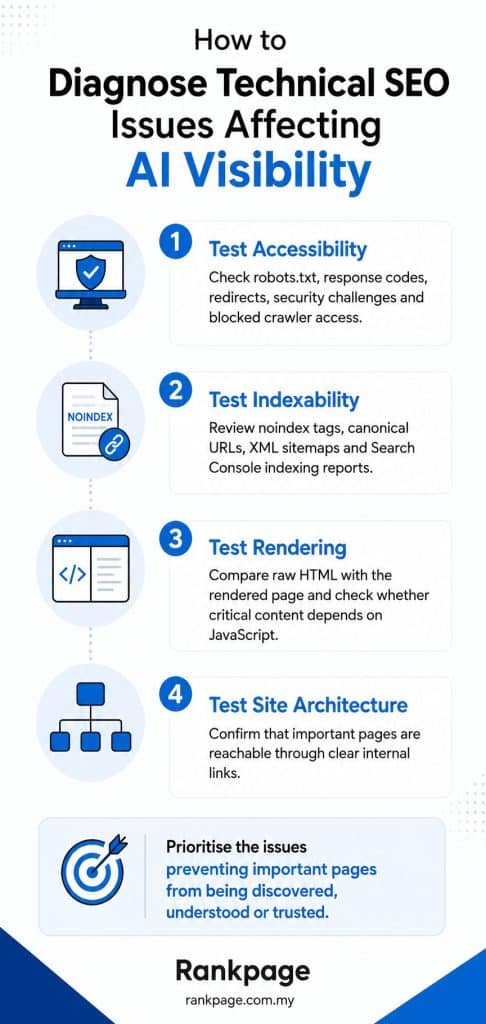
Start with a crawl and indexing audit, then compare what users see with what automated crawlers can retrieve.
For Singapore businesses conducting their own SEO audit Singapore review:
First, test accessibility: Check robots.txt, response codes, redirects and whether important sections are available without security challenges.
Next, test indexability: Review noindex directives, canonicals, XML sitemaps and Search Console indexing reports.
Then, test rendering: Compare raw HTML with the rendered page. If core copy only appears after JavaScript executes, investigate server-side rendering or pre-rendering.
Finally, test architecture: Check whether priority pages are reachable through sensible internal links.
Google Search Console’s URL Inspection tool can help diagnose how Google crawls and renders a URL.
A crawler such as Screaming Frog or Sitebulb can reveal sitewide patterns including canonicals, redirects, broken links and robots directives. To identify true orphaned URLs, combine crawl data with sources such as XML sitemaps, Search Console or analytics.
The useful question is:
Which technical issue is preventing the pages that actually matter from being discovered, understood or trusted?
Should You DIY An Audit Or Use A Professional SEO Audit?
A DIY audit is reasonable for a small website with a simple structure.
If you use a standard CMS and rarely make major development changes, you can uncover plenty by checking Search Console, robots.txt, your sitemap, indexability and PageSpeed Insights.
Professional auditing becomes more useful when the site has JavaScript frameworks, international versions, ecommerce filters, custom development, thousands of URLs or unexplained indexing problems.
DIY Audit May Be Enough When | Professional Audit Makes More Sense When |
The site is small and straightforward | The site contains hundreds or thousands of URLs |
A standard CMS is used | A headless or JavaScript-heavy framework is involved |
Problems affect only a few pages | Indexing problems affect whole sections |
You mainly need basic hygiene checks | SEO, developers and infrastructure teams need coordinated fixes |
At Rankpage, we think the definition of a website SEO audit Singapore companies commission needs to evolve.
Checking whether Google can crawl the site is still essential. But businesses increasingly need to understand whether the same technical setup also supports discovery by AI search systems.
That does not require a separate discipline called “AI technical SEO.” It means auditing technical SEO with a wider set of machines in mind.
How Often Should A Singapore Business Run An SEO Audit?
For many established websites, one or two comprehensive audits a year can be a practical starting point, with additional checks after redesigns, migrations or major development changes.
There is no universal schedule. Smaller, stable websites may only need periodic reviews, while larger or frequently updated sites usually benefit from more continuous monitoring.
Read More: Schema Markup: How Singapore Websites Can Win Featured Snippets and AI Search Citations
Fixing Your Citation and Visibility Issues
Most technical problems blocking AI visibility are familiar SEO problems showing up in a new discovery environment.
Blocked crawlers, wrong canonicals, poor internal linking, inaccessible JavaScript content and unstable servers can all weaken the foundation on which AI visibility depends.
Before creating pages specifically for AI search, make sure the content you already have is genuinely accessible and understandable.
If you are unsure what is holding your website back, Rankpage can help identify the technical issues affecting both traditional search and emerging AI discovery. As a SEO consultant in Singapore, our SEO approach combines technical auditing, content optimisation and search visibility strategy so businesses can fix the blockers that matter.
Sources
- OpenAI Help Center: Publishers and Developers FAQ
- OpenAI Help Center: Advertiser Guidance for Allowing OpenAI Web Crawlers
- Google Search Central: Optimizing for Generative AI Features
- Google Search Central: How Google Search Works
- Google Search Central: JavaScript SEO Basics
- Google Search Central: Fix Search-Related JavaScript Problems
- Google Search Central: Fix Lazy-Loaded Website Content
- Google Search Central: Core Web Vitals
- Google Search Central: Canonicalisation Documentation
- Google Search Central: Link Best Practices
- Screaming Frog: How To Find Orphan Pages